• INICIO
  • PRODUCTS
    • Professional stage wireless microphone
    • Fixed engineering wireless microphone
    • Antenna/Antenna Signal Distribution System
    • Digital mixing console
    • Microphone head / Headband / Collar clip
    • Chorus/Singing/Musical Instrument Microphone/Meeting/Speech
    • Supporting/Measuring/Instrument/Tool
    • WTC3 software
  • OEM
  • SERVICES
  • Distribution
  • ABOUT
  • CASE
  • NEWS
Páginas personalizadas
  • PRODUCTS
  • OEM
  • SERVICES
  • Distribution
  • ABOUT
  • CASE
  • NEWS
Enlaces adicionales
  • Professional stage wireless microphone
  • Fixed engineering wireless microphone
  • Antenna/Antenna Signal Distribution System
  • Digital mixing console
  • Microphone head / Headband / Collar clip
  • Chorus/Singing/Musical Instrument Microphone/Meeting/Speech
  • Supporting/Measuring/Instrument/Tool
  • WTC3 software
  • Inicio
  • AMSaudio News
  • Detalles de la noticia
Volver

AMSaudio CR4 Signal Drop? Learn Two Easy Steps to Troubleshoot – Anyone Can Do It!

luna    2026-03-12
sub-brand

Recently many friends have contacted me saying that when they use the AMSaudio CR4, they experience signal drop issues and ask how to solve it. Actually, there’s no need to worry. Most signal drops are caused by weak signal or interference. Today I’ll explain it in simple terms and show you two steps to check. After reading this, you’ll be able to do it yourself and greatly reduce the chance of signal drop!

Step 1: Check the RF signal strength – this is the foundation!

Remember this: the CR4 receiver has an RF meter. It shows how strong the wireless microphone signal received by the receiver is. No matter which venue you are using, first set up the receiver properly, then hold the tail of the microphone and walk to the place where it will normally be used. Keep watching the RF meter on the receiver — as long as the signal does not become obviously weaker or drop significantly, or only drops slightly, then the signal is usable and there is no problem.

Step 2: Check channel interference to make sure every channel is clean

If you finish the first step and all four CR4 microphones show normal signal, then move to the second step — checking channel interference. This step is very important. When multiple microphones are used at the same time, most signal drop problems come from here.

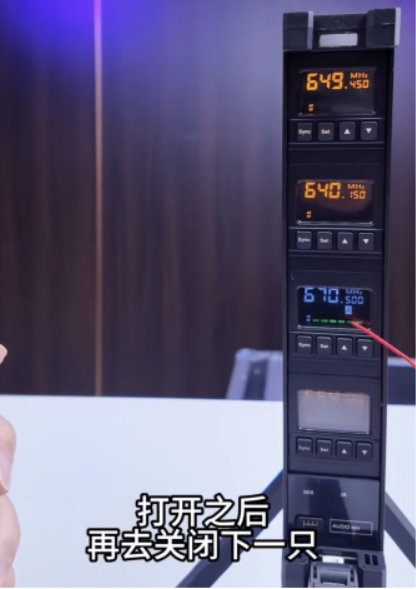
The operation is very simple: first turn on all four microphones. Then turn them off one by one. Each time you turn one off, check the corresponding channel on the receiver. As long as there is no same-frequency signal flashing, it means the channel is clean and there is no interference. Then turn that microphone back on and turn off the next one. Repeat this process for all four channels to make sure every channel is clean.
微信图片_20260312141359_429_31

In summary, CR4 signal drop is actually not difficult to solve! As long as you follow these two steps — ensure the signal strength is strong enough and make sure there is no channel interference — the probability of signal drop will be greatly reduced and the system will run very stably.

Additional reminder: Try to place the CR4 higher to avoid obstruction

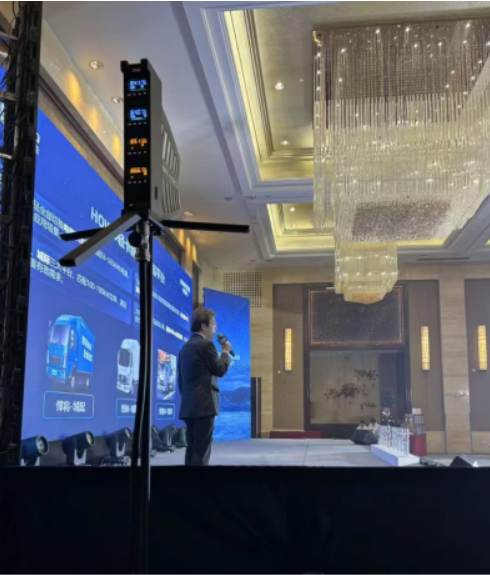
Here’s a small reminder for everyone: try to mount the CR4 receiver as high as possible, preferably on a stand. Because it uses an integrated blade antenna and receiver design, raising it higher helps avoid obstacles that may block the signal and ensures smooth signal transmission. Remember not to place the receiver behind LED screens or other large objects, otherwise the signal may be affected and cause signal drop.
微信图片_20260312141412_430_31

Artículos recientes

Wireless Microphone Dropouts: Causes and a Step-by-Step Fix

Wireless Microphon...

2026-09-18
​ Why Is My Wireless Microphone Too Quiet or Cutting In and Out?

​ Why Is My Wirele...

2026-09-17
How Should the Output Level of a Wireless Microphone Receiver Be Set?

How Should the Out...

2026-09-16
How Should Rental Companies Manage Multiple Wireless Microphone Systems?

How Should Rental ...

2026-09-15
What Should Be Checked on a Wireless System Before a Performance or Event?

What Should Be Che...

2026-09-14
How to Reduce Feedback When Using Wireless Microphones in Churches and Auditoriums

How to Reduce Feed...

2026-09-11
How to Design a Stable Wireless Microphone System for Conference Rooms?

How to Design a St...

2026-09-10
How to Choose Handheld, Headset, and Lavalier Wireless Microphones for Presenting, Training, and Stage Performance

How to Choose Hand...

2026-09-09
Why Does a Wireless Microphone Battery Drain So Quickly? What Should I Check?

Why Does a Wireles...

2026-09-08
How to Troubleshoot Wireless Microphone System Issues

How to Troubleshoo...

2026-09-07
Volver arriba
8619805208160
Diode (Guangdong) Technology Co., Ltd.
Diode (Guangdong) Technology Co., Ltd
  • Research and Development Center
  • Dirección:16th Floor, Building 6, Zone A, Hantian Technology City 17 Shenhai Road, Guicheng Subdistrict Nanhai District, Foshan City Guangdong Province
  • Whatsapp:+8619805208160
  • Customer Center
  • Dirección:Unit 301, 3rd Floor, Building 3, Zone A, Hantian Technology City 17 Shenhai Road, Guicheng Subdistrict, Nanhai District, Foshan City
  • Whatsapp:+8619805208160

PRODUCTS

  • Professional stage wireless microphone
  • Fixed engineering wireless microphone
  • Antenna/Antenna Signal Distribution System
  • Digital mixing console
  • Microphone head / Headband / Collar clip
  • Chorus/Singing/Musical Instrument Microphone/Meeting/Speech
  • Supporting/Measuring/Instrument/Tool
  • WTC3 software

OEM

  • OEM

SERVICES

  • On-site Service
  • Technical Training
  • Return to factory for maintenance
  • Product Specifications

Distribution

  • Distribution

ABOUT

  • ABOUT
  • NEWS

PRODUCTS

OEM

SERVICES

Distribution

© 2024 Diode (Guangdong) Technology Co., Ltd. AMSaudio Wireless Audio Derechos de autor|Número de registro: